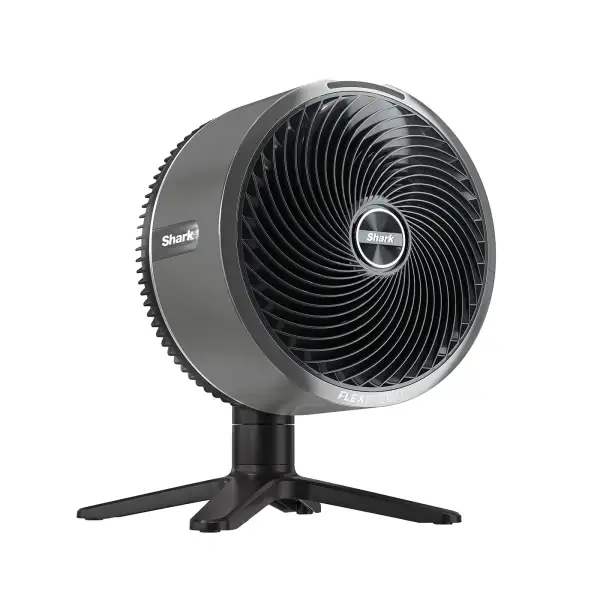
Shark FlexBreeze TableMate Indoor to Outdoor High-Velocity Tabletop Fan FA150UK
Shark FlexBreeze TableMate Indoor to Outdoor High-Velocity Tabletop Fan FA150UK
Outdoors to Indoors. Corded and Cordless. The Shark FlexBreeze TableMate delivers exceptional cooling power that goes where you go.
- Corded & cordless with up to 24 hours* of cordless runtime.
- Powerful cooling — up to 20m cooling reach.
- Customise your cooling – 5 adjustable speeds, 180° oscillation & 55° tilt
- Quiet Performance – perfect for sleeping and working at home
- UV & water-resistant design** - tough enough for the outdoors, rain or shine.
- Dimensions: H:40cm W:35cm L:40cm. Weight: 3kg. Colour: Winter Fog
- 2-year guarantee
*Based on fan speed 1 without oscillation
**Materials UV-resistant per UL746CIPX5 rating.

Up to 24 hours of cordless runtime*
Switch from corded to cordless: Plug FlexBreeze TableMate in for continuous power or go cordless for up to 24 hours* *Based on fan speed 1 without oscillation

Outdoor tough, indoor sleek
Outdoor tough, indoor sleek: FlexBreeze TableMate is UV * and rain resistant for durability outdoors, while remaining sleek and quiet indoors *Materials UV-resistant per UL746C. Excludes remote control

Up to 20 meters cooling reach
Whether indoors or outdoors, Shark FlexBreeze TableMate’s powerful fan can keep you cool even from a distance

Customise your cool
Customise you cool with the touch of button and select from up to 5 fan speeds. And with 180 degrees of side-to-side oscillation, and a 55-degree up-and-down tilt, everyone can benefit from the breeze.
| Colour | Winter Fog |
| Product Weight | 3kg |
| Product Dimensions (cm) | H:40cm W:35cm L:40cm |
| Wattage | 36W |
| Number of Speeds | 5 |
| Material | Plastic |
| Guarantee | 2 Years |
| Barcode | 622356304665 |
What's Included:
- Main Unit
- FlexBreeze Fan Head
- Charging Cable
- Remote (Lithium-Ion Button Battery Included)
Frequently Asked Questions
Click on a question below to view the answer.
How Many Speeds Does My Fan Have?
Your fan features 5 speed settings plus a Boost Mode. To select a speed, use the speed button on the fan head or the speed arrows on the remote control. LED lights will temporarily indicate the selected speed.
What Oscillation Settings Does My Fan Have?
Your fan can oscillate at 45°, 90°, or 180°. To select an oscillation angle, press the oscillation button on the fan head or use the oscillation arrows on the remote. LED lights will temporarily indicate the selected angle.
What Tilting Settings Does My Fan Have?
Your fan can be manually tilted using the integrated handle to direct airflow upwards or downwards. The fan offers a tilt range of up to 55°.
How Do I Turn On Strong Breeze Mode?
To activate Strong Breeze Mode, press the Speed Up arrow on the remote control. LED lights will temporarily indicate when the setting has been selected.
How Do I Turn On Gentle Breeze Mode?
To activate Gentle Breeze Mode, press the Speed Down arrow on the remote control. LED lights will temporarily indicate when the setting has been selected.
How Long Does The Fan Take To Charge?
From completely empty to fully charged, the fan typically takes approximately 5–6 hours to charge.
How Long Will The Fan Run On A Full Charge?
The fan can operate for up to 20 hours on Speed 1 or approximately 2 hours on Speed 5. For a complete breakdown of runtime across all speed settings, please refer to the instruction manual.
Can I Leave The Fan Outdoors?
The fan is water-resistant and can withstand light rain. However, it is not designed for heavy rain or submersion in water. It is recommended to bring the fan indoors during adverse weather conditions and to store it indoors when not in use for extended periods.
Shark FlexBreeze TableMate Indoor to Outdoor High-Velocity Tabletop Fan FA150UK
Outdoors to Indoors. Corded and Cordless. The Shark FlexBreeze TableMate delivers exceptional cooling power that goes where you go.
- Corded & cordless with up to 24 hours* of cordless runtime.
- Powerful cooling — up to 20m cooling reach.
- Customise your cooling – 5 adjustable speeds, 180° oscillation & 55° tilt
- Quiet Performance – perfect for sleeping and working at home
- UV & water-resistant design** - tough enough for the outdoors, rain or shine.
- Dimensions: H:40cm W:35cm L:40cm. Weight: 3kg. Colour: Winter Fog
- 2-year guarantee
*Based on fan speed 1 without oscillation
**Materials UV-resistant per UL746CIPX5 rating.
Up to 24 hours of cordless runtime*
Switch from corded to cordless: Plug FlexBreeze TableMate in for continuous power or go cordless for up to 24 hours* *Based on fan speed 1 without oscillation
Outdoor tough, indoor sleek
Outdoor tough, indoor sleek: FlexBreeze TableMate is UV * and rain resistant for durability outdoors, while remaining sleek and quiet indoors *Materials UV-resistant per UL746C. Excludes remote control
Up to 20 meters cooling reach
Whether indoors or outdoors, Shark FlexBreeze TableMate’s powerful fan can keep you cool even from a distance
Customise your cool
Customise you cool with the touch of button and select from up to 5 fan speeds. And with 180 degrees of side-to-side oscillation, and a 55-degree up-and-down tilt, everyone can benefit from the breeze.
| Colour | Winter Fog |
| Product Weight | 3kg |
| Product Dimensions (cm) | H:40cm W:35cm L:40cm |
| Wattage | 36W |
| Number of Speeds | 5 |
| Material | Plastic |
| Guarantee | 2 Years |
| Barcode | 622356304665 |
What's Included:
- Main Unit
- FlexBreeze Fan Head
- Charging Cable
- Remote (Lithium-Ion Button Battery Included)
Frequently Asked Questions
Click on a question below to view the answer.
How Many Speeds Does My Fan Have?
Your fan features 5 speed settings plus a Boost Mode. To select a speed, use the speed button on the fan head or the speed arrows on the remote control. LED lights will temporarily indicate the selected speed.
What Oscillation Settings Does My Fan Have?
Your fan can oscillate at 45°, 90°, or 180°. To select an oscillation angle, press the oscillation button on the fan head or use the oscillation arrows on the remote. LED lights will temporarily indicate the selected angle.
What Tilting Settings Does My Fan Have?
Your fan can be manually tilted using the integrated handle to direct airflow upwards or downwards. The fan offers a tilt range of up to 55°.
How Do I Turn On Strong Breeze Mode?
To activate Strong Breeze Mode, press the Speed Up arrow on the remote control. LED lights will temporarily indicate when the setting has been selected.
How Do I Turn On Gentle Breeze Mode?
To activate Gentle Breeze Mode, press the Speed Down arrow on the remote control. LED lights will temporarily indicate when the setting has been selected.
How Long Does The Fan Take To Charge?
From completely empty to fully charged, the fan typically takes approximately 5–6 hours to charge.
How Long Will The Fan Run On A Full Charge?
The fan can operate for up to 20 hours on Speed 1 or approximately 2 hours on Speed 5. For a complete breakdown of runtime across all speed settings, please refer to the instruction manual.
Can I Leave The Fan Outdoors?
The fan is water-resistant and can withstand light rain. However, it is not designed for heavy rain or submersion in water. It is recommended to bring the fan indoors during adverse weather conditions and to store it indoors when not in use for extended periods.
Description
Shark FlexBreeze TableMate Indoor to Outdoor High-Velocity Tabletop Fan FA150UK
Outdoors to Indoors. Corded and Cordless. The Shark FlexBreeze TableMate delivers exceptional cooling power that goes where you go.
- Corded & cordless with up to 24 hours* of cordless runtime.
- Powerful cooling — up to 20m cooling reach.
- Customise your cooling – 5 adjustable speeds, 180° oscillation & 55° tilt
- Quiet Performance – perfect for sleeping and working at home
- UV & water-resistant design** - tough enough for the outdoors, rain or shine.
- Dimensions: H:40cm W:35cm L:40cm. Weight: 3kg. Colour: Winter Fog
- 2-year guarantee
*Based on fan speed 1 without oscillation
**Materials UV-resistant per UL746CIPX5 rating.
Up to 24 hours of cordless runtime*
Switch from corded to cordless: Plug FlexBreeze TableMate in for continuous power or go cordless for up to 24 hours* *Based on fan speed 1 without oscillation
Outdoor tough, indoor sleek
Outdoor tough, indoor sleek: FlexBreeze TableMate is UV * and rain resistant for durability outdoors, while remaining sleek and quiet indoors *Materials UV-resistant per UL746C. Excludes remote control
Up to 20 meters cooling reach
Whether indoors or outdoors, Shark FlexBreeze TableMate’s powerful fan can keep you cool even from a distance
Customise your cool
Customise you cool with the touch of button and select from up to 5 fan speeds. And with 180 degrees of side-to-side oscillation, and a 55-degree up-and-down tilt, everyone can benefit from the breeze.
| Colour | Winter Fog |
| Product Weight | 3kg |
| Product Dimensions (cm) | H:40cm W:35cm L:40cm |
| Wattage | 36W |
| Number of Speeds | 5 |
| Material | Plastic |
| Guarantee | 2 Years |
| Barcode | 622356304665 |
What's Included:
- Main Unit
- FlexBreeze Fan Head
- Charging Cable
- Remote (Lithium-Ion Button Battery Included)
Frequently Asked Questions
Click on a question below to view the answer.
How Many Speeds Does My Fan Have?
Your fan features 5 speed settings plus a Boost Mode. To select a speed, use the speed button on the fan head or the speed arrows on the remote control. LED lights will temporarily indicate the selected speed.
What Oscillation Settings Does My Fan Have?
Your fan can oscillate at 45°, 90°, or 180°. To select an oscillation angle, press the oscillation button on the fan head or use the oscillation arrows on the remote. LED lights will temporarily indicate the selected angle.
What Tilting Settings Does My Fan Have?
Your fan can be manually tilted using the integrated handle to direct airflow upwards or downwards. The fan offers a tilt range of up to 55°.
How Do I Turn On Strong Breeze Mode?
To activate Strong Breeze Mode, press the Speed Up arrow on the remote control. LED lights will temporarily indicate when the setting has been selected.
How Do I Turn On Gentle Breeze Mode?
To activate Gentle Breeze Mode, press the Speed Down arrow on the remote control. LED lights will temporarily indicate when the setting has been selected.
How Long Does The Fan Take To Charge?
From completely empty to fully charged, the fan typically takes approximately 5–6 hours to charge.
How Long Will The Fan Run On A Full Charge?
The fan can operate for up to 20 hours on Speed 1 or approximately 2 hours on Speed 5. For a complete breakdown of runtime across all speed settings, please refer to the instruction manual.
Can I Leave The Fan Outdoors?
The fan is water-resistant and can withstand light rain. However, it is not designed for heavy rain or submersion in water. It is recommended to bring the fan indoors during adverse weather conditions and to store it indoors when not in use for extended periods.